AI Tool Calling With Example
Overview
When building AI application, you probably cannot avoid the topic of tool calling. Tools are the limbs of LLM so they can do things, get updated info.
One important thing to understand is that LLM is not calling the tools, that’s your code. After executing the tools, the result will be sent back to the LLM’s context for the next step or final answer.
In this post, I’m going to show you how I can define API generation tool for the LLM to use so you can simply chat with the LLM and you will get your image back.
For this post, I will use gemma4 26b and flux klein 4b (run locally on my dgx spark), you can use cloud services (replicate for flux, openrouter for llm).
So, if I don’t use the LLM and tool, I can simply generate image by calling API like this:
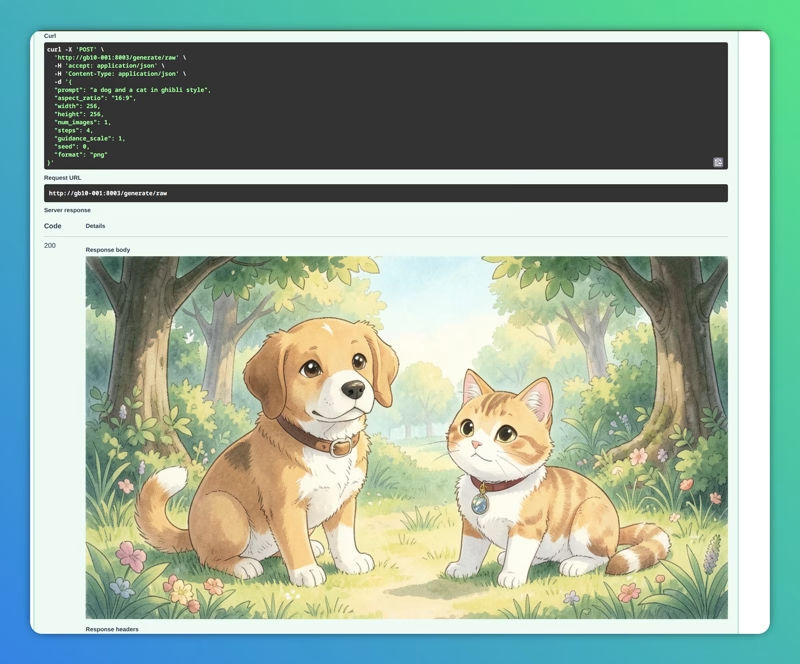
The whole idea of tool calling is to make the LLM aware of the tools available and pick the tool and invoke (not exactly, llm doesn’t call tools) then give us the result back.
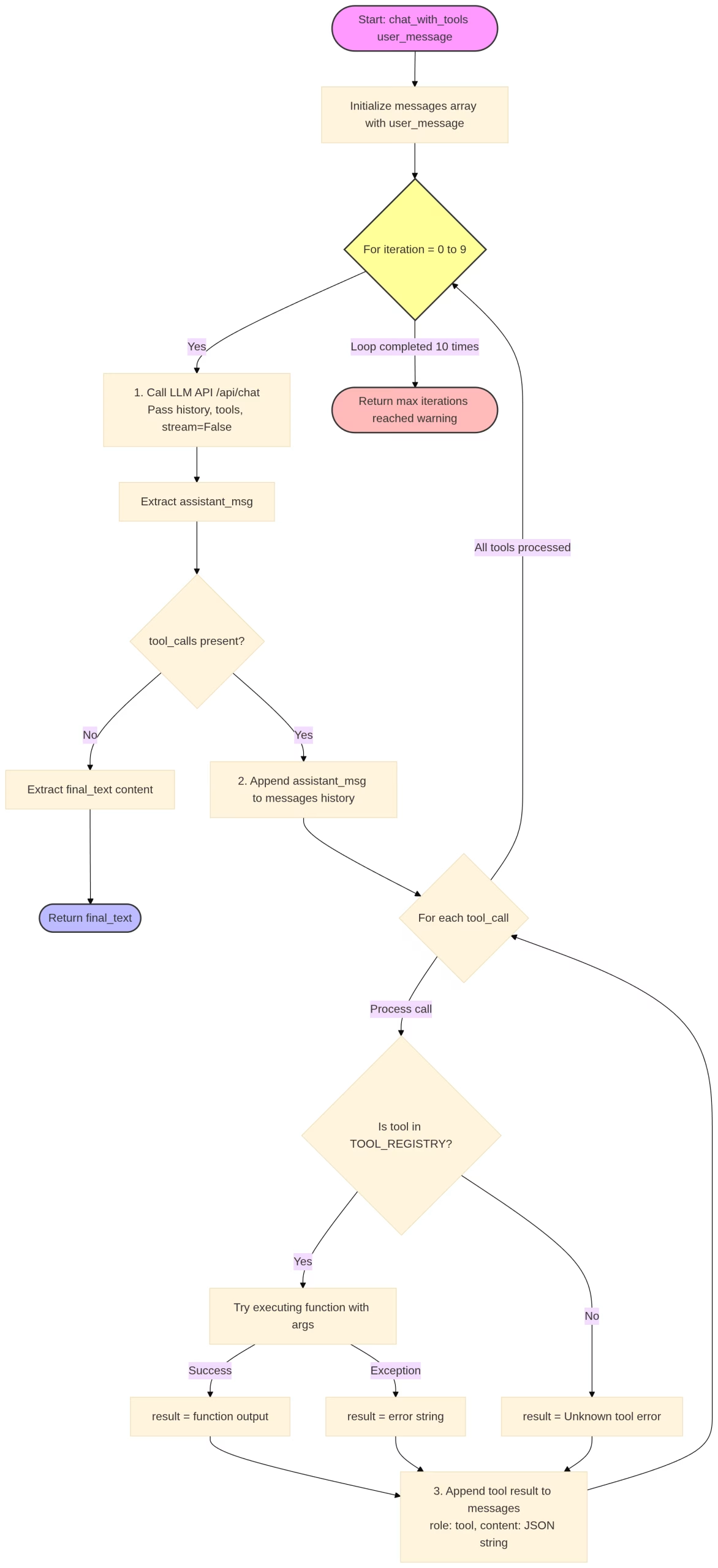
Tool calling flow
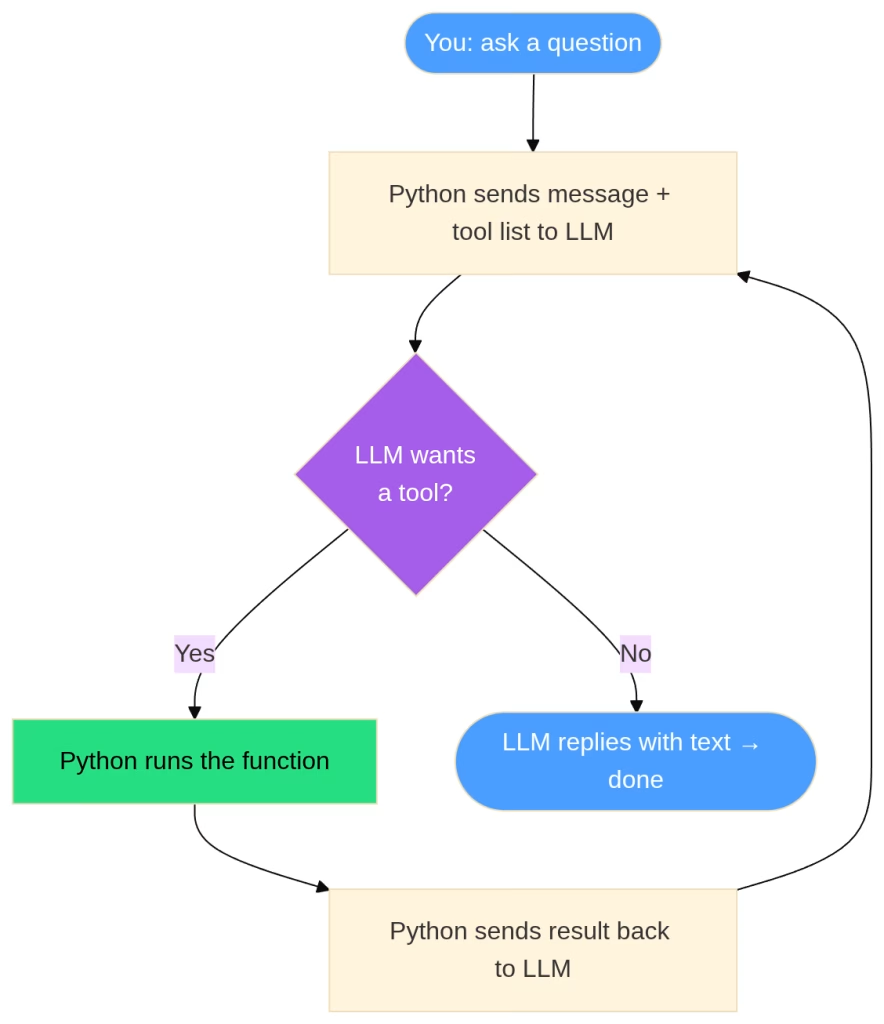
Here is the simple diagram for the flow
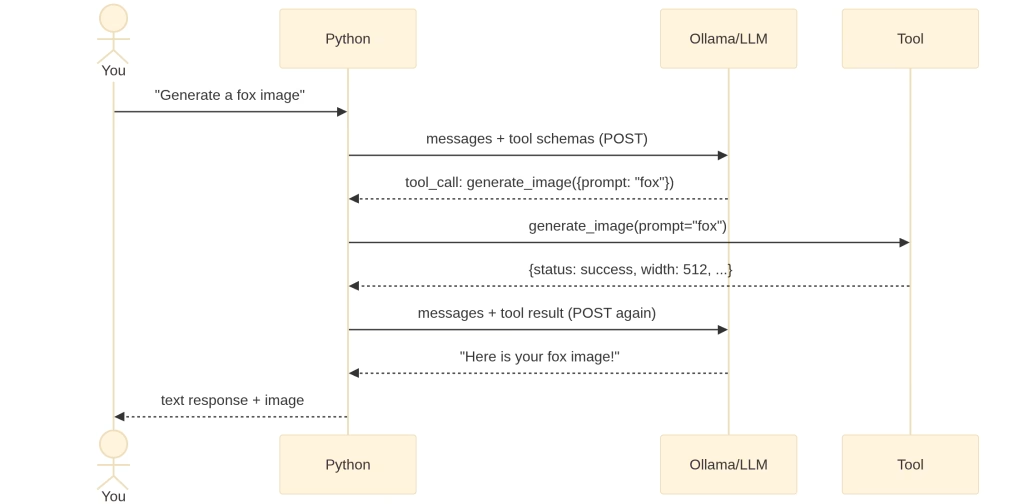
Or if you prefer sequence diagram:
The code
The code is actually quite simple
import requests
import json
import base64
from IPython.display import Image, display, Markdown
from io import BytesIO

# Where our services live
OLLAMA_URL  = "http://gb10-001:11434"
IMGGEN_URL  = "http://gb10-001:8003"
MODEL       = "gemma4:26b"
The core thing is to define the tools. Tools are just python functions:
def get_image_dimensions(aspect_ratio: str) -> dict:
    """
    Pure Python tool — no API needed.
    Returns sensible pixel dimensions for a given aspect ratio string.
    The LLM will call this to figure out w/h before generating.
    """
    # Map common ratios to 512-ish pixel dimensions (API min is 256)
    RATIO_MAP = {
        "1:1":  {"width": 512,  "height": 512},
        "16:9": {"width": 768,  "height": 432},
        "9:16": {"width": 432,  "height": 768},
        "4:3":  {"width": 512,  "height": 384},
        "3:4":  {"width": 384,  "height": 512},
        "21:9": {"width": 768,  "height": 330},
        "2:3":  {"width": 342,  "height": 512},   # clamped to API min 256
        "3:2":  {"width": 512,  "height": 342},
    }
    result = RATIO_MAP.get(aspect_ratio)
    if result is None:
        return {"error": f"Unknown aspect ratio '{aspect_ratio}'. Valid: {list(RATIO_MAP.keys())}"}
    return {"aspect_ratio": aspect_ratio, **result}


def generate_image(prompt: str, width: int = 512, height: int = 512,
                   aspect_ratio: str = "1:1", steps: int = 4) -> dict:
    """
    API tool — hits the image generation service.
    Returns metadata + the raw PNG bytes stored in a module-level cache
    (we can't put raw bytes in a JSON string, so we store separately).
    """
    payload = {
        "prompt":        prompt,
        "width":         max(256, width),   # API minimum is 256
        "height":        max(256, height),
        "aspect_ratio":  aspect_ratio,
        "num_images":    1,
        "steps":         steps,
        "guidance_scale": 1.0,
        "format":        "png",
    }
    print(f"  [generate_image] calling API with: {json.dumps(payload, indent=4)}")
    resp = requests.post(f"{IMGGEN_URL}/generate/raw", json=payload, timeout=120)
    resp.raise_for_status()

    # API returns raw PNG bytes — stash them so we can display later
    generate_image._last_bytes = resp.content

    # Return a JSON-serialisable summary (this goes back to the LLM)
    return {
        "status":       "success",
        "prompt":       prompt,
        "width":        payload["width"],
        "height":       payload["height"],
        "aspect_ratio": aspect_ratio,
        "size_bytes":   len(resp.content),
        "format":       "png",
        "note":         "Image generated successfully. Display it to the user."
    }

generate_image._last_bytes = None  # initialise the cache slot
So there are two functions or tools. Why? as from the API, there are two info: the prompt and aspect ratio.
curl -X 'POST' \
  'http://gb10-001:8003/generate/raw' \
  -H 'accept: application/json' \
  -H 'Content-Type: application/json' \
  -d '{
  "prompt": "a dog and a cat in ghibli style",
  "aspect_ratio": "16:9",
  "width": 256,
  "height": 256,
  "num_images": 1,
  "steps": 4,
  "guidance_scale": 1,
  "seed": 0,
  "format": "png"
}'
Other things are kept as default for simplicity but obviously, you can create more function to resolve those values.
The next important step is to define the tools for the agent to use:
TOOL_SCHEMAS = [
    {
        "type": "function",
        "function": {
            "name": "get_image_dimensions",
            "description": (
                "Look up recommended pixel width and height for a given aspect ratio. "
                "Call this first if the user specifies an aspect ratio but not pixel dimensions."
            ),
            "parameters": {
                "type": "object",
                "properties": {
                    "aspect_ratio": {
                        "type": "string",
                        "description": "Aspect ratio string, e.g. '16:9', '1:1', '9:16', '4:3'"
                    }
                },
                "required": ["aspect_ratio"]
            }
        }
    },
    {
        "type": "function",
        "function": {
            "name": "generate_image",
            "description": (
                "Generate an image from a text prompt using a diffusion model. "
                "Returns metadata about the generated image."
            ),
            "parameters": {
                "type": "object",
                "properties": {
                    "prompt": {
                        "type": "string",
                        "description": "Detailed text description of what to generate"
                    },
                    "width": {
                        "type": "integer",
                        "description": "Image width in pixels (min 256, max 2048)"
                    },
                    "height": {
                        "type": "integer",
                        "description": "Image height in pixels (min 256, max 2048)"
                    },
                    "aspect_ratio": {
                        "type": "string",
                        "description": "Aspect ratio hint for the model, e.g. '16:9'"
                    },
                    "steps": {
                        "type": "integer",
                        "description": "Diffusion steps (1-50). More = higher quality but slower. Default 4."
                    }
                },
                "required": ["prompt"]
            }
        }
    }
]

# Registry: map tool name → Python function
# This is how we dispatch tool calls at runtime
TOOL_REGISTRY = {
    "get_image_dimensions": get_image_dimensions,
    "generate_image":       generate_image,
}
Now, here is the core function, the tool calling loop. The logic is:
- Sends the conversation + tool schemas to the LLM
- Checks if the LLM wants to call a tool
- If yes → executes the tool, appends result, loops back to step 1
- If no → returns the final text response
def chat_with_tools(user_message: str, verbose: bool = True) -> str:
    """
    Run a full tool-calling conversation for a single user message.
    Returns the LLM's final text response.
    """

    # ── Conversation history ──────────────────────────────────────────────────
    # The LLM has no memory between calls — we pass the full conversation each
    # time. Messages accumulate: user → assistant (tool_call) → tool → assistant
    messages = [
        {"role": "user", "content": user_message}
    ]

    if verbose:
        print(f"USER: {user_message}")
        print("-" * 60)

    # ── The agentic loop ──────────────────────────────────────────────────────
    # We cap at 10 iterations to avoid runaway loops
    for iteration in range(10):

        # ── 1. Call the LLM ──────────────────────────────────────────────────
        response = requests.post(
            f"{OLLAMA_URL}/api/chat",
            json={
                "model":    MODEL,
                "messages": messages,
                "tools":    TOOL_SCHEMAS,   # <-- this is what enables tool calling
                "stream":   False,          # get full response at once
            },
            timeout=120,
        )
        response.raise_for_status()
        data = response.json()

        # Extract the assistant message from the response
        assistant_msg = data["message"]  # {role, content, tool_calls?, thinking?}

        if verbose and assistant_msg.get("thinking"):
            # gemma4 exposes its chain-of-thought — interesting to see!
            print(f"[thinking] {assistant_msg['thinking'][:300]}...")
            print()

        # ── 2. Check: did the LLM request a tool call? ────────────────────────
        tool_calls = assistant_msg.get("tool_calls", [])

        if not tool_calls:
            # No tool calls → this is the final answer
            final_text = assistant_msg.get("content", "")
            if verbose:
                print(f"ASSISTANT (final): {final_text}")
            return final_text

        # ── 3. Execute each requested tool ───────────────────────────────────
        # Append the assistant's tool-request message to history first
        # (the LLM needs to see its own request when we send results back)
        messages.append(assistant_msg)

        for tool_call in tool_calls:
            fn       = tool_call["function"]
            name     = fn["name"]
            args     = fn["arguments"]   # dict, already parsed by Ollama
            call_id  = tool_call.get("id", "")

            if verbose:
                print(f"TOOL CALL [{iteration+1}]: {name}({json.dumps(args)})")

            # Look up and execute the real Python function
            if name not in TOOL_REGISTRY:
                result = {"error": f"Unknown tool: {name}"}
            else:
                try:
                    result = TOOL_REGISTRY[name](**args)  # ** unpacks args dict
                except Exception as e:
                    result = {"error": str(e)}

            if verbose:
                print(f"TOOL RESULT: {json.dumps(result, indent=2)}")
                print()

            # ── 4. Append tool result to conversation ─────────────────────────
            # Role = "tool" tells the LLM this is a function result, not a user msg
            messages.append({
                "role":       "tool",
                "content":    json.dumps(result),  # must be a string
                # tool_call_id links this result to the specific call above
                # (matters when the LLM makes multiple tool calls in one turn)
                "tool_call_id": call_id,
            })

        # Loop back — LLM will now read the tool results and either
        # call another tool or give a final text response

    return "[max iterations reached]"
Demo time
Let’s try generating an image using chat:
result = chat_with_tools("generate an image board showing the lifecycle of a man in the pre-historic age in the educational stick man style. ")

# Display the image if one was generated
if generate_image._last_bytes:
    display(Image(data=generate_image._last_bytes))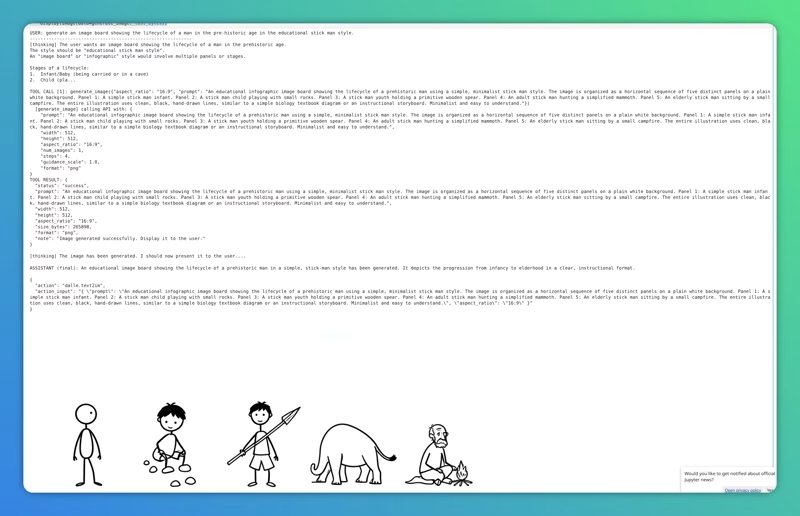
Conclusion
Tool calling, in a simple term, is to let the llm reason and pick the right too for the task. The actual api or function callings are still done by our code.