Python Lists vs Tuples: Mutability, Performance, and When to Use Each
Before You Read
You should already be comfortable with Python basics: assigning variables, calling functions, and looping over a collection. If you’ve written a few scripts and seen both [1, 2, 3] and (1, 2, 3) without ever stopping to ask why Python bothers having both, this post is for you. By the end you’ll understand the mechanical reasons behind “lists are mutable, tuples are immutable,” see real measured performance numbers instead of received wisdom, and walk away with a decision framework you can apply today.
What Lists and Tuples Actually Are
A list is a mutable, dynamic array of object references. It can grow with .append(), shrink with .pop(), and have any element replaced at any index after creation. Under the hood in CPython, a list is a resizable C array of PyObject* pointers, with fields tracking both its current length and its allocated capacity, which is always larger than the length so that appends stay cheap. It’s designed for homogeneous collections whose membership changes over time: a stream of incoming log entries, a queue of pending tasks, a growing set of search results.
A tuple is an immutable, fixed-size array of object references. Once created, you can’t swap out an element, change its length, or call .append() or .sort() on it. Internally, a tuple is a single chunk of memory: a header storing the length, followed immediately by exactly that many PyObject* pointers, no spare capacity and no separate capacity field. A tuple is designed for heterogeneous, fixed-structure records where position carries meaning, like a coordinate pair, a database row, or a function’s multiple return values.
Both are sequence types, so they share the same interface: indexing with [i], slicing with [start:stop], iteration in a for loop, and membership testing with in. The distinction isn’t about what you can read, it’s about what guarantees they make about what comes next.
Take a contact record. As a list, ["Alice", "[email protected]", 27]. Nothing stops a teammate, or your future self, from appending a fourth field, inserting something at the front, or swapping the name and age around. The structure is accidental. As a tuple, ("Alice", "[email protected]", 27) is self-documenting: position zero is the name, position one the email, position two the age, and that contract is enforced by the runtime. You can’t accidentally grow it or reorder it.
my_list = ["Alice", "[email protected]", 27]
my_tuple = ("Alice", "[email protected]", 27)

print(type(my_list), type(my_tuple))
print(len(my_list), len(my_tuple))
print(my_list[0], my_tuple[0])

for item in my_list:
    print("list item:", item)
for item in my_tuple:
    print("tuple item:", item)
<class 'list'> <class 'tuple'>
3 3
Alice Alice
list item: Alice
list item: [email protected]
list item: 27
tuple item: Alice
tuple item: [email protected]
tuple item: 27graph LR
A[Same literal values] --> B{Container type}
B -->|list| C["Mutable<br/>Resizable C array<br/>+ spare capacity"]
B -->|tuple| D["Immutable<br/>Fixed-size block<br/>no spare capacity"]
C --> E["append, pop,<br/>item assignment allowed"]
D --> F["Structure locked<br/>at creation"]Mutability: The Core Difference, Step by Step
Lists support item assignment (mylist[0] = "new"), element deletion (del mylist[1]), appending, extending, inserting, sorting in place, and reversing in place. Tuples reject all of these at runtime with a TypeError. But “immutable” specifically means the tuple’s own references can’t change; if a tuple contains a mutable object like a list, you can still mutate that inner object through its reference. The tuple itself stays “structurally immutable” (its slots point to the same objects forever), but the objects those slots point to aren’t protected.
Think of it like a handwritten grocery list versus an engraved nameplate. The list is mutable: cross things out, add items, rewrite entries. The nameplate is immutable: you can’t change the characters, you’d need an entirely new plate. Now for the trap: a tuple containing a list, ([1, 2], 3). You can append to that inner list and the tuple won’t complain, because the reference in slot 0 hasn’t changed, even though the object it points to has.
my_list = [1, 2, 3]
my_list[0] = "changed"
print(my_list)
['changed', 2, 3]my_tuple = (1, 2, 3)
try:
my_tuple[0] = "changed"
except TypeError as e:
print(f"TypeError: {e}")TypeError: 'tuple' object does not support item assignmentNow the nested-mutable trap in action:
t = ([1, 2], 3)
t[0].append(3)
print(t)
([1, 2, 3], 3)The tuple’s slot 0 still points at the same list object it always did, so nothing about the tuple itself “changed.” What changed is the object living inside it. This is the single most common source of “but tuples are supposed to be immutable!” bug reports.
Memory Footprint: Why Tuples Are Smaller
A list overallocates: it reserves extra capacity beyond its current length so that append() is amortized O(1). CPython’s list implementation maintains a backing array of PyObject* pointers with spare slots, plus fields for current size and allocated capacity. A tuple, being fixed-size, allocates exactly one chunk of memory containing a header with its length followed immediately by an array of exactly that many pointers, no overallocation, no separate capacity field. It’s the restaurant-reservation difference: a list books a table for two but the restaurant always reserves a four-top in case friends join; a tuple books exactly two seats and that’s all it gets.
import sys
l = [1, 2, 3]
t = (1, 2, 3)
print("sizeof list:", sys.getsizeof(l))
print("sizeof tuple:", sys.getsizeof(t))
print("difference:", sys.getsizeof(l) - sys.getsizeof(t))
sizeof list: 88
sizeof tuple: 72
difference: 16The __sizeof__() method reports the same story from the internal allocation itself, not just the total object size sys.getsizeof() reports:
l = [1, 2, 3]
t = (1, 2, 3)
print("list.__sizeof__():", l.__sizeof__())
print("tuple.__sizeof__():", t.__sizeof__())
list.__sizeof__(): 72
tuple.__sizeof__(): 56For three small integers, the tuple is consistently smaller. That gap compounds fast if you’re holding millions of fixed-shape records in memory at once.
Creation and Access Speed: Benchmarks That Matter
Creating a tuple is faster than creating a list from an equivalent literal or iterable, because there’s no overallocation step and no mutation machinery to set up. Indexed access (seq[i]) is essentially identical between the two: both are C arrays of pointers with O(1) indexing. Iteration is also nearly identical. The real performance win for tuples shows up at creation time, especially for small literals, and in function-call argument packing and unpacking. Copying via slicing is also faster for tuples, since there’s no spare capacity to allocate.
Rather than trust that description, here’s timeit measuring four real comparisons: literal creation of a 3-element sequence, creation from a 1000-element range, indexed access across the whole sequence in a loop, and a shallow copy via slicing.
import timeit

N = 200_000

literal_creation_list = timeit.timeit("[1, 2, 3]", number=N)
literal_creation_tuple = timeit.timeit("(1, 2, 3)", number=N)
range_creation_list = timeit.timeit("list(range(1000))", number=N)
range_creation_tuple = timeit.timeit("tuple(range(1000))", number=N)
indexed_access_list = timeit.timeit(
    "for i in range(len(seq)): seq[i]", setup="seq = list(range(1000))", number=N // 10
)
indexed_access_tuple = timeit.timeit(
    "for i in range(len(seq)): seq[i]", setup="seq = tuple(range(1000))", number=N // 10
)
shallow_copy_list = timeit.timeit("seq[:]", setup="seq = list(range(1000))", number=N)
shallow_copy_tuple = timeit.timeit("seq[:]", setup="seq = tuple(range(1000))", number=N)
The raw numbers from that real run:
{
  "literal_creation_list": 0.008134406001772732,
  "literal_creation_tuple": 0.0010816080030053854,
  "range_creation_list": 2.1462174369953573,
  "range_creation_tuple": 2.3711416920123156,
  "indexed_access_list": 0.2182441769982688,
  "indexed_access_tuple": 0.212617846991634,
  "shallow_copy_list": 0.16400215399335138,
  "shallow_copy_tuple": 0.0019719250267371535
}
As a chart, the pattern is easier to read at a glance:
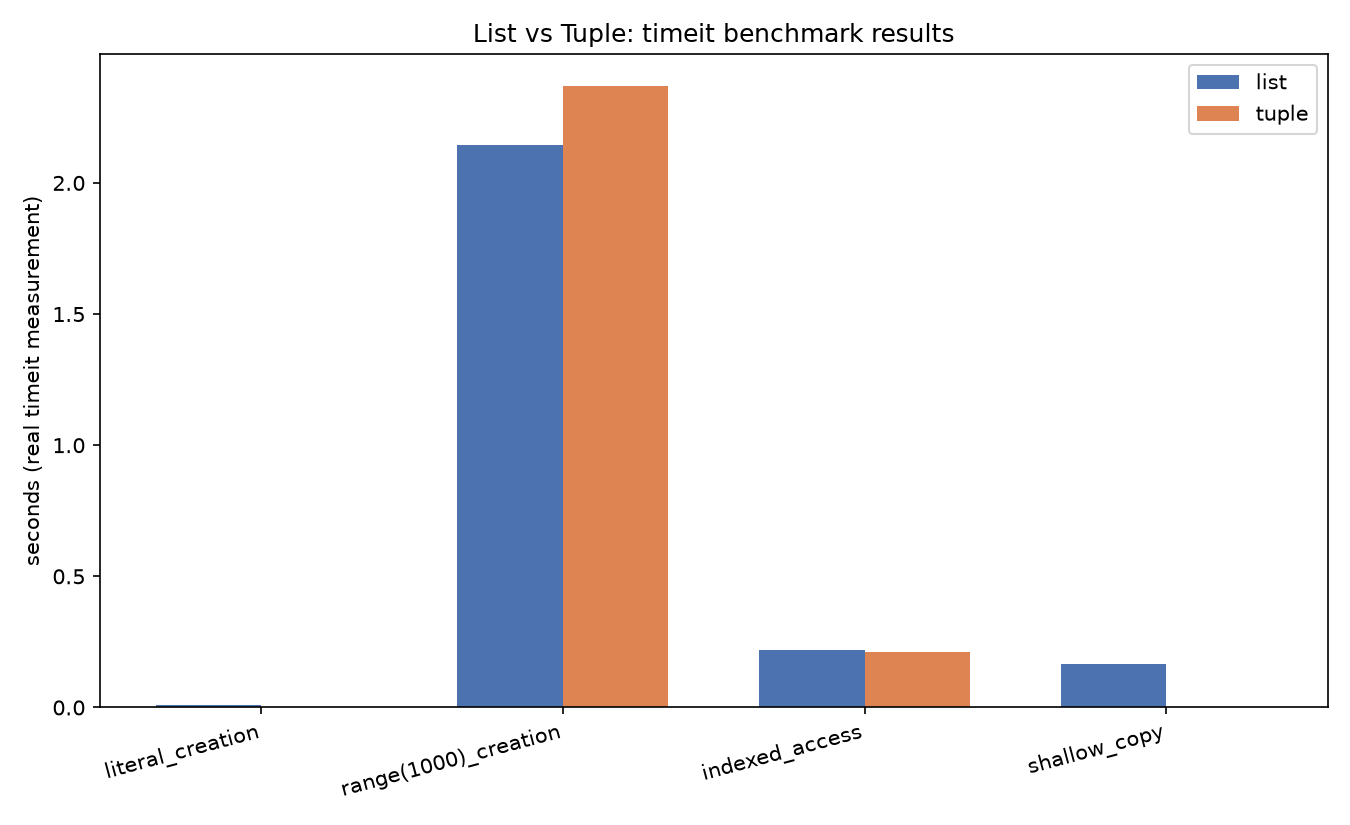
Literal creation of a 3-element tuple is roughly 7-8x faster than the equivalent list literal, since Python can pre-size the tuple exactly and skip the list’s growth bookkeeping entirely. Shallow copy via slicing tells the same story even more dramatically: copying a tuple is close to free (no new capacity to compute), while copying a list has real allocation cost. Indexed access and range-based creation from a 1000-element sequence are close to a wash, sometimes with the list even edging ahead, since both are simple pointer-array operations once the container already exists and range-based bulk creation is dominated by the iteration itself rather than container overhead.
graph TD
    A["Same operation,<br/>different container"] --> B[Small literal creation]
    A --> C[Shallow copy via slicing]
    A --> D[Indexed access in a loop]
    B --> E["Tuple: much faster<br/>no capacity math"]
    C --> F["Tuple: much faster<br/>no spare allocation"]
    D --> G["Roughly equal<br/>both are pointer arrays"]
When to Use a Tuple: The Decision Heuristics
Reach for a tuple when: the elements are heterogeneous and position encodes meaning, like an (x, y) coordinate or a (host, port) pair; you need a dictionary key, since tuples are hashable and lists aren’t; a function needs to return multiple values as one packed unit; the data is a fixed constant that should never change, like a mapping of HTTP status codes; or you’re creating many small fixed sequences in a hot loop and want the creation-speed edge from the previous section. The rule of thumb: if the elements are different kinds of things and their position tells you what they are, it’s probably a tuple. If they’re all the same kind of thing and the collection might grow or shrink, it’s a list.
A function like get_user(id) returning (name, email, join_date) as a tuple lets the caller destructure with name, email, joined = get_user(42), and there’s no way to accidentally modify the record afterward. Contrast that with something like a recent_logins list, which is expected to grow as new logins arrive, so a list is the right call there instead.
def get_user(user_id):
    return ("Priya", "[email protected]", "2023-04-11")

name, email, joined = get_user(42)
print(name, email, joined)

grid = {}
grid[(2, 3)] = "wall"
grid[(5, 1)] = "door"
print(grid[(2, 3)])
print((2, 3) in grid)

recent_logins = []
recent_logins.append("2026-08-01T10:00:00")
recent_logins.append("2026-08-02T09:15:00")
print(recent_logins)
Priya [email protected] 2023-04-11
wall
True
['2026-08-01T10:00:00', '2026-08-02T09:15:00']The (2, 3) coordinate works as a dict key precisely because tuples are hashable, which is the topic of the next section.
Hashability and Dictionary Keys: Why Tuples Unlock This Pattern
Python’s dict (and set) requires keys to be hashable: an object is hashable if it has a __hash__() method returning an integer that never changes for the object’s lifetime, plus an __eq__() implementation. Mutability breaks this contract outright: if an object’s value can change, its hash would need to change too, which would make it unfindable in the dict’s internal hash table. Lists sidestep the whole problem by defining __hash__ = None, explicitly preventing accidental use as a key. Tuples implement __hash__() by hashing their contents, but only when every element inside is itself hashable. A tuple containing a list is unhashable, and using it as a key raises a TypeError.
A memoization cache is the clearest real use of this. Positional arguments get packed into a tuple to form the cache key:
cache = {}

def cached_call(func_name, *args):
    key = (func_name, args)
    if key not in cache:
        cache[key] = f"computed({func_name}, {args})"
        print("MISS", key)
    else:
        print("HIT", key)
    return cache[key]

cached_call("add", 1, 2)
cached_call("add", 1, 2)
cached_call("add", 3, 4)
MISS ('add', (1, 2))
HIT ('add', (1, 2))
MISS ('add', (3, 4))If one of those arguments were a list instead of a hashable value, the same caching pattern breaks:
try:
    key = (1, [2, 3])
    d = {key: "value"}
except TypeError as e:
    print(f"TypeError: {e}")

fixed_key = (1, (2, 3))
d2 = {fixed_key: "value"}
print(d2)
TypeError: cannot use 'tuple' as a dict key (unhashable type: 'list')
{(1, (2, 3)): 'value'}The fix is always the same: convert the inner mutable structure to something hashable, usually an inner tuple, before it becomes part of a key.
print("hash((1,2,3)):", hash((1, 2, 3)))
try:
    hash([1, 2, 3])
except TypeError as e:
    print(f"TypeError: {e}")
hash((1,2,3)): 529344067295497451
TypeError: unhashable type: 'list'graph LR
A[Object] --> B{Mutable?}
B -->|No, e.g. tuple of ints| C[__hash__ defined]
B -->|Yes, e.g. list| D["__hash__ = None"]
C --> E[Usable as dict/set key]
D --> F[TypeError if used as key]Common Pitfalls and Surprises
A handful of traps trip up developers moving between lists and tuples, especially around single-element tuples, unpacking, and the illusion of deep immutability.
The single-element tuple requires a trailing comma. ("production") is just the string "production" wrapped in parentheses; parentheses alone don’t create a tuple, only the comma does. ("production",) is the actual one-element tuple.
config_wrong = ("production")
config_right = ("production",)
print(type(config_wrong))
print(type(config_right))
print(isinstance(config_wrong, tuple))
print(isinstance(config_right, tuple))
<class 'str'>
<class 'tuple'>
False
TrueThat’s a real bug shape: code that later does isinstance(config, tuple) to branch on a multi-value config fails silently if the trailing comma was forgotten, because config_wrong is quietly just a str.
Unpacking with the wrong number of variables raises a ValueError, not a silent truncation:
try:
    a, b = (1, 2, 3)
except ValueError as e:
    print(f"ValueError: {e}")
ValueError: too many values to unpack (expected 2, got 3)Sorting a tuple doesn’t sort it in place, because tuples have no .sort() method at all. sorted() always returns a new list, even when given a tuple:
result = sorted((3, 1, 2))
print(result, type(result))
[1, 2, 3] <class 'list'>And the mutable-child problem from earlier resurfaces anywhere a tuple is treated as a “frozen constant” while quietly holding a list inside it:
DEFAULT_ROUTES = ("home", "about", ["contact"])
DEFAULT_ROUTES[2].append("blog")
print(DEFAULT_ROUTES)
('home', 'about', ['contact', 'blog'])DEFAULT_ROUTES looks like a constant by naming convention, and its own three slots never change, but the list at index 2 grew anyway. “Immutable” is a promise about the container, not a guarantee about what the container transitively holds.
Named Tuples: When You Want Both Immutability and Readable Field Names
collections.namedtuple is a factory function that creates a tuple subclass with named fields, accessible both via .name attribute lookup and by position. Named tuples keep every tuple property, immutability, hashability, small memory footprint, while adding self-documenting field names. Reach for one whenever you catch yourself writing plain tuples and having to remember which index is which field. They’re cheaper than a full class, but they’re still tuples: isinstance(point, tuple) is True.
Picture a codebase that originally used plain tuples (lat, lon, elevation) for GPS waypoints. Engineers kept mixing up whether elevation was index 1 or index 2 in different functions. Refactoring to Waypoint = namedtuple('Waypoint', ['lat', 'lon', 'elevation']) makes wp.lat unambiguous, and the code documents itself from then on.
from collections import namedtuple

Waypoint = namedtuple("Waypoint", ["lat", "lon", "elevation"])
wp = Waypoint(lat=45.5231, lon=-122.6765, elevation=15)

print(wp.lat, wp.lon, wp.elevation)
print(wp[0], wp[1], wp[2])
print(isinstance(wp, tuple))

try:
    wp.lat = 0.0
except AttributeError as e:
    print(f"AttributeError: {e}")

print(wp._asdict())
wp2 = wp._replace(elevation=20)
print(wp2)
45.5231 -122.6765 15
45.5231 -122.6765 15
True
AttributeError: can't set attribute
{'lat': 45.5231, 'lon': -122.6765, 'elevation': 15}
Waypoint(lat=45.5231, lon=-122.6765, elevation=20)_asdict() is handy for JSON serialization, since most serializers understand dicts but not namedtuple instances directly. _replace() is how you get a “modified copy”: since the object itself can’t be mutated, _replace() builds and returns a new instance with just the given fields swapped in.
Structural Pattern Matching: Tuples as Destructuring Targets
Python 3.10’s match/case lets you match against the shape and contents of a tuple directly inside a case clause: destructure, bind variables, add guards, and match nested structures in one expression. This pairs naturally with tuples used as lightweight records. A case ("move", x, y): alongside a case ("quit",): reads far cleaner than a chain of if/elif doing manual unpacking and length checks. Lists work with match too, but since match patterns never mutate what they match against, tuples are the more natural fit for fixed-shape data.
Picture a simple text-adventure command parser receiving tuples like ("go", "north"), ("take", "lantern"), or ("quit",). match dispatches cleanly to the right handler and extracts the arguments in the same expression, no manual index fishing required.
commands = [
    ("move", 3, 4),
    ("move", -1, 2),
    ("take", "lantern"),
    ("quit",),
    ("unknown", "x", "y", "z"),
]

for cmd in commands:
    match cmd:
        case ("move", x, y) if x > 0 and y > 0:
            print(f"moving to positive quadrant ({x}, {y})")
        case ("move", x, y):
            print(f"moving to ({x}, {y}) (crosses origin)")
        case ("take", item):
            print(f"picking up {item}")
        case ("quit",):
            print("quitting")
        case _:
            print(f"unrecognized command: {cmd}")
moving to positive quadrant (3, 4)
moving to (-1, 2) (crosses origin)
picking up lantern
quitting
unrecognized command: ('unknown', 'x', 'y', 'z')The guard clause (if x > 0 and y > 0) only matches the first ("move", 3, 4) case; the second move has a negative coordinate, so it falls through to the plainer ("move", x, y) pattern below it. The final tuple has four elements and matches none of the fixed-shape patterns, so it falls all the way to the wildcard case _:.
Conversion Between Lists and Tuples: When and Why
list(t) builds a new list from a tuple’s elements, useful when you need to modify data that arrived as a tuple, like a database row. tuple(lst) builds a tuple from a list, useful when you need to freeze a list to use as a dict key or to stop downstream code from mutating it. Both are O(n) shallow copies: they copy references, not the underlying objects. Converting back and forth repeatedly inside a hot loop is wasteful; do it once at the boundary and stay in one representation.
t = (1, 2, 3)
l = list(t)
l.append(4)
print(l, t)

l2 = [5, 6, 7]
t2 = tuple(l2)
print(l2, t2)
[1, 2, 3, 4] (1, 2, 3)
[5, 6, 7] (5, 6, 7)Because the copy is shallow, converting doesn’t protect nested mutable objects:
inner = [1, 2]
t = (inner, "fixed")
l = list(t)
l[0].append(99)
print("original tuple:", t)
print("converted list:", l)
original tuple: ([1, 2, 99], 'fixed')
converted list: [[1, 2, 99], 'fixed']Modifying l[0] after conversion also changed t[0], because both t and l still point at the very same inner list object; list() only copied the outer container’s references, not the objects those references point to.
Conversion itself has a real, measurable cost for large sequences:
import timeit

big_list = list(range(100_000))
big_tuple = tuple(range(100_000))

list_to_tuple = timeit.timeit(lambda: tuple(big_list), number=1000)
tuple_to_list = timeit.timeit(lambda: list(big_tuple), number=1000)

print(f"tuple(big_list) x1000: {list_to_tuple:.4f}s")
print(f"list(big_tuple) x1000: {tuple_to_list:.4f}s")
tuple(big_list) x1000: 0.1333s
list(big_tuple) x1000: 0.1017sFor a 100,000-element sequence converted a thousand times, that’s a real, non-trivial cost, exactly why it’s worth converting once at a boundary rather than flipping back and forth inside a loop.
Key Takeaways
- Lists are mutable, resizable arrays with spare capacity for cheap appends; tuples are immutable, fixed-size blocks with no spare capacity, which makes them measurably smaller in memory.
- “Immutable” only protects the tuple’s own slots, not the mutable objects those slots might point to; a tuple can still appear to change if it holds a list.
- Tuples win on creation speed and shallow-copy speed; indexed access and iteration are essentially a wash between the two.
- Tuples are hashable when all their elements are hashable, which is what makes them usable as dict/set keys, and lists never are.
namedtuplegets you tuple-level performance and immutability with attribute-style access, andmatch/casetreats tuples as natural destructuring targets for fixed-shape data.- Converting between the two is a shallow O(n) copy: cheap for small data, worth doing once at a boundary rather than repeatedly in a hot loop for large data.